Welcome to InForm!
You've just logged into the InForm platform. This main page is your home base for creating, exploring, and managing parametric design projects. Let's walk through what you're seeing.
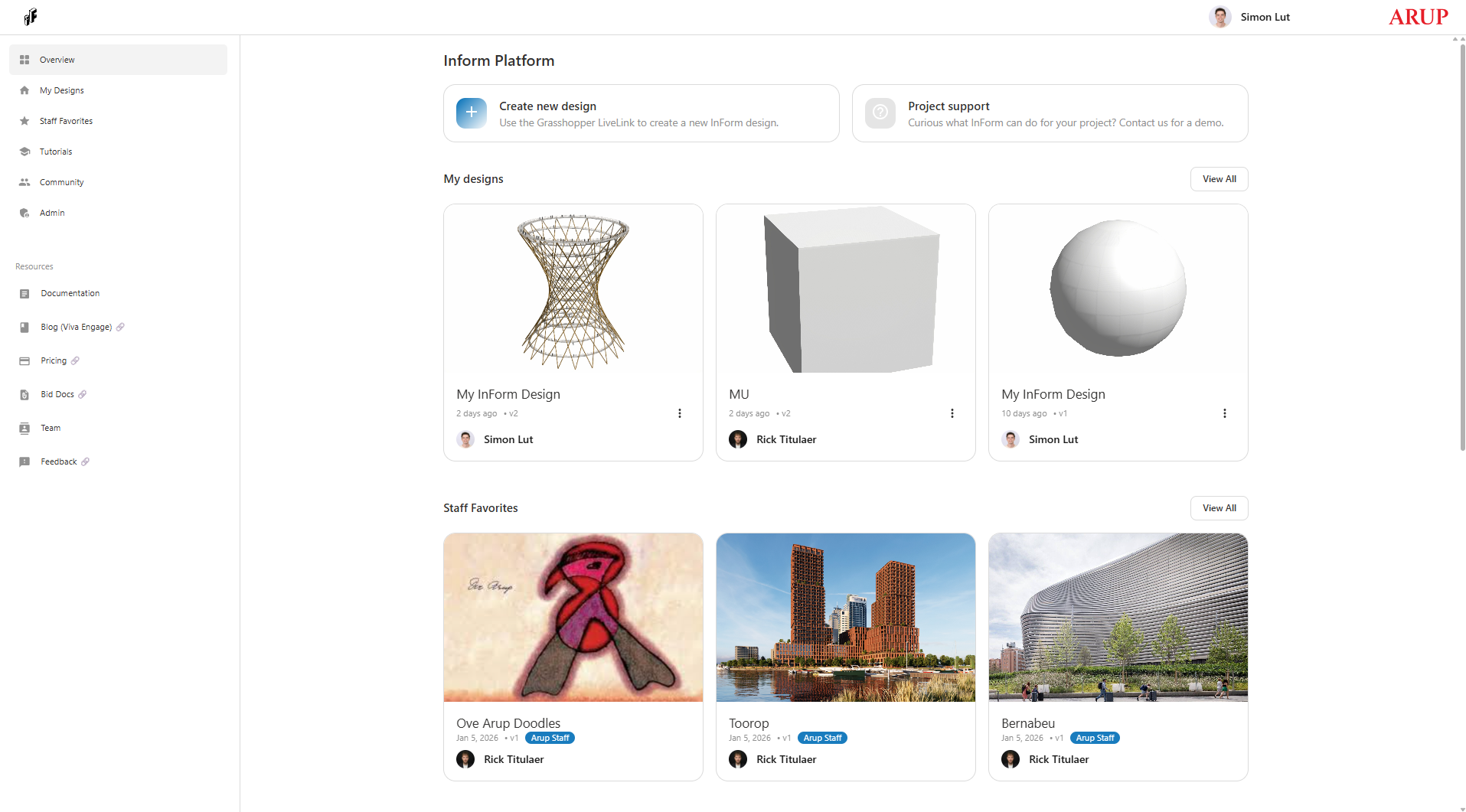
What You See at the Top
At the very top of the page:
- InForm logo (top-left corner) - Click this anytime to return to this home page
- Your name and profile (top-right corner) - That's you! You're logged in with your Arup account
- Search bar - Type here to quickly find anything in the documentation
The Sidebar on the Left
The sidebar provides quick access to all platform sections:
Down the left side, you'll see navigation links organized into two groups:
Where You Can Go
- Overview - That's this page! Your starting point every time you log in
- My Designs - Your personal workspace where all your designs live
- Staff Favorites - Check out impressive projects from the InForm team for inspiration
- Tutorials - New to InForm? Start here for installation help and examples
- Community - Browse designs your colleagues have shared publicly
Helpful Resources
- Documentation - Detailed guides for everything InForm can do
- Blog (Viva Engage) - Stay updated on new features and tips
- Pricing - Learn about licensing and project costs
- Bid Docs - Materials to help you pitch InForm to clients
- Team - Meet the people building and supporting InForm
- Feedback - Tell us about bugs, ideas, or questions
The Main Area: Getting Started
Ready to Create?
Right at the top, you'll see two cards:
Create new design - This is where your journey begins! Click here to upload a Grasshopper script and turn it into an interactive web experience.
Project support - Need help? The InForm team is here to answer questions and give demos.
Your Recent Work
Below the action cards, you'll see My Designs - a preview of projects you've created or have access to. Each card shows:
- A preview image of the design
- The project name
- When it was last updated
- Who created it
- A menu (⋮) for more options like publishing or sharing
Don't have any designs yet? No problem! Hit that blue Create new design button to get started.
Click View All to see your complete design library as it grows.
Get Inspired
The Staff Favorites section showcases real projects from teams across Arup. These are hand-picked examples that show what's possible with InForm:
- Professional project presentations
- Advanced parametric workflows
- Creative interface designs
Click on any project to explore it and see how it works. You can learn from these examples and even use them as templates for your own work.
Your First Steps
If you're brand new:
- Click Tutorials in the sidebar to learn how to install the InForm Grasshopper plugin
- Download an example script to see how it works
- Come back here and click Create new design to upload your first project
If you have a Grasshopper script ready:
- Click the Create new design button
- Follow the prompts to upload your script
- Customize the interface for your users
- Share it with your team!
Need inspiration first?
- Browse Staff Favorites to see professional examples
- Check out the Community section to see what colleagues are building
- Visit Documentation for component references and guides
Welcome aboard! We're excited to see what you'll create.
Provides a general introduction to the platform.
From here users can:
- Create a new design
- Explore example projects
- Request support from the InForm team